LinkedIn ads guide: Campaign types, ad specs, and expert tips
Key takeaways
- LinkedIn ads reach over 1.3 billion professionals, making it the top platform for B2B advertisers to influence buying committees.
- LinkedIn offers 12+ ad formats, from single image and video to Connected TV and Thought Leader ads, each suited to different campaign objectives.
- Average LinkedIn ad costs run higher than other social platforms, but stronger B2B targeting typically delivers a better cost per lead for qualified buyers.
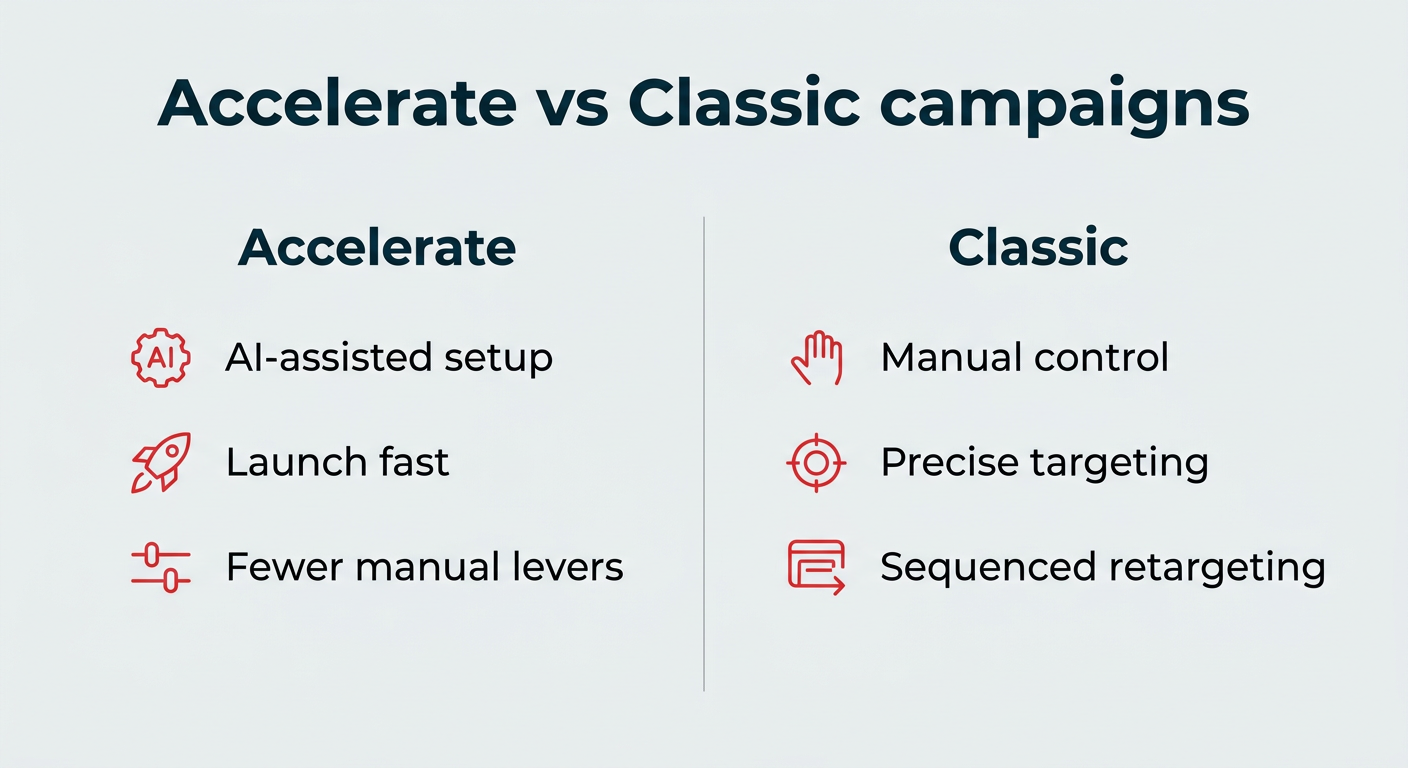
- Start with Accelerate campaigns for speed, then shift to Classic for precise retargeting and sequenced funnels.
Why advertise on LinkedIn in 2026
LinkedIn advertising is worth it for B2B marketers because it reaches decision-makers in a professional context you cannot replicate elsewhere. The platform is built around real career data, so you can target by job title, company, seniority, and industry rather than guessing from interests.
That precision matters when you are selling to a buying committee, not a single shopper. With B2B social trends in 2026 pointing toward more first-party data strategies, here are a few reasons teams keep investing in LinkedIn ads:
- Professional targeting: Reach buyers by job title, function, seniority, industry, company size, and skills, using data members keep current themselves.
- Buyer intent: People come to LinkedIn to learn, research vendors, and grow their careers, so your message lands in a work mindset.
- Brand safety: Ads appear in a professional feed, not next to unpredictable user content.
- Full-funnel capability: From awareness video to lead capture forms, one platform supports every stage of the journey.
LinkedIn reports its audience now tops 1.3 billion members, giving advertisers unmatched scale for reaching professional audiences. For B2B teams that need quality over raw volume, that combination of scale and precision is the core of the case for LinkedIn advertising.
How do you set up your LinkedIn ads account?
Setting up your account in LinkedIn Campaign Manager takes just a few minutes. Follow these four steps to get ready to launch your first campaign in 2026.
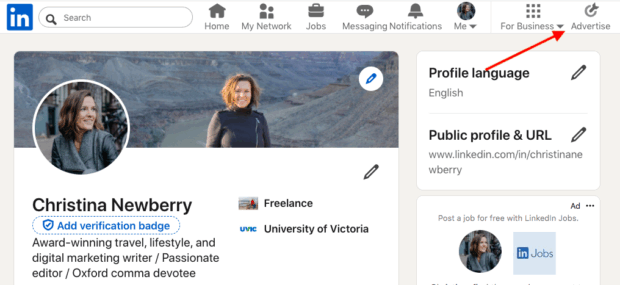
1. Open Campaign Manager
Log in to LinkedIn and click Advertise in the top navigation.
Source: LinkedIn
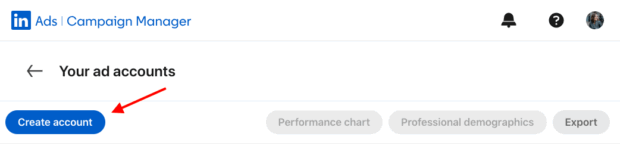
2. Create your ad account
Click Create account, then add an account name and choose your billing currency.
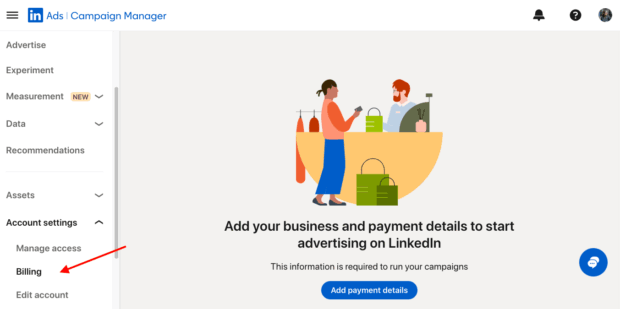
3. Do your admin set-up
Select the LinkedIn Company Page you’ll advertise from, add a payment method (Account settings → Billing → Add payment details), and set permissions for teammates (Account settings → Manage access).
Note: Some formats can run without a Page, but connecting your Page now is best practice. You can authorize a Sponsored Content Poster if needed.
4. Start your first campaign
From your account dashboard, click Create. You’ll choose an objective and build your first Accelerate or Classic campaign (we’ll cover which to use next).
Bonus: Download a free step-by-step guide to combining organic and paid social tactics into a winning LinkedIn strategy.
How does the LinkedIn ad auction work?
When you advertise on LinkedIn, an auction system decides when your ad is served and how much you pay. Your ad competes with others that have similar formats and target audiences, and the winning ad maximizes value for both the member and the advertiser.
Bid strategies (pick one per campaign)
Maximum delivery (automated)
LinkedIn sets bids to spend your budget efficiently and maximize results for your objective. Best when you need scale and simplicity.
Cost cap
You set a target cost per result and LinkedIn auto-adjusts bids to keep your average near or below that cap while maximizing volume. Best when you need cost control without going fully manual. Available for brand awareness, website visits, engagement, video views and lead generation objectives.
Manual bidding
You specify the amount you’d like to bid for tighter test design or niche audiences. Best when you want strict control and are willing to monitor and adjust.
Budgeting and pacing
Use daily or lifetime budgets. Lifetime lets LinkedIn pace spend over time to hit your objective more efficiently. Avoid making too many reactive changes; pacing and learning work best with stable settings.
How do you make it work?
Start new campaigns on Maximum delivery, then move to Cost cap (or Manual) once you have a baseline. Choose lifetime budget for steadier performance. When tuning bids or budgets, make small, spaced-out changes and give the campaign time to relearn.
How much do LinkedIn ads cost in 2026?
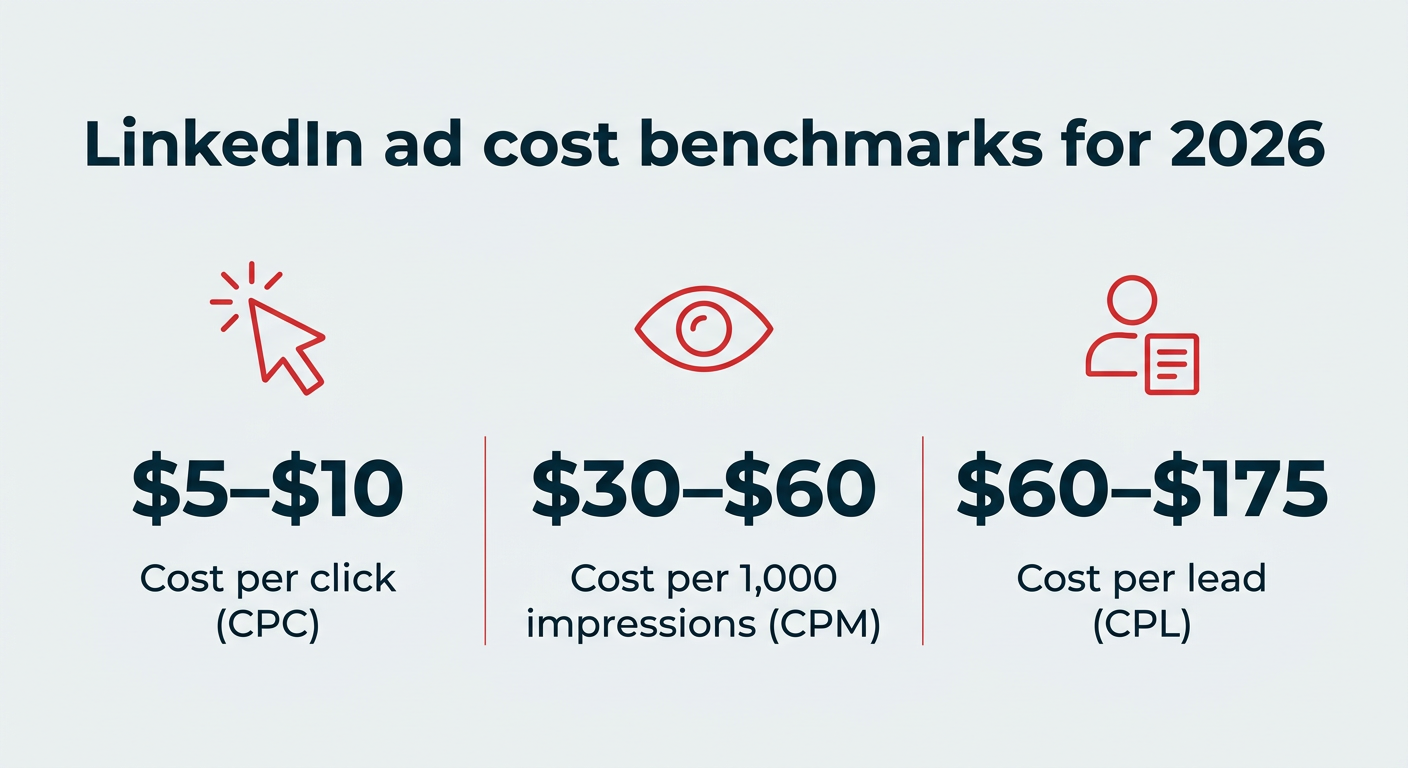
LinkedIn ads typically cost more per click than other social platforms. LinkedIn does not publish fixed rates because pricing is auction-based, but third-party benchmarks for 2026 commonly cluster around $5–$10 per click, $30–$60 per 1,000 impressions, and $60–$175 per lead.
Treat these as directional only — your actual costs will vary by audience, objective, industry, and bid strategy.
Several factors move your LinkedIn ad cost up or down:
- Audience competitiveness: Popular job titles and industries cost more because more advertisers bid on them.
- Objective: Lead generation and conversion goals usually cost more than awareness or reach.
- Ad relevance: Higher engagement and quality scores lower your effective cost.
- Time of year: Costs rise during busy periods like Q4 as competition peaks.
- Industry: Regulated and high-value sectors like financial services and tech tend to see higher costs.
Here is how LinkedIn’s typical cost ranges compare to other platforms for B2B campaigns.
| Platform | Avg. CPC | Avg. CPM | Avg. CPL |
|---|---|---|---|
| $5–$10 | $30–$60 | $60–$175 (2026 third-party benchmarks; LinkedIn’s official pricing is auction-based and not published as fixed rates) |
LinkedIn sits at the higher end on cost per lead, but the leads it delivers tend to be closer to your ideal buyer. For most B2B teams, a good cost per lead is one that produces qualified pipeline, not just the cheapest form fill. Judge value on downstream opportunity quality, not the raw click price.
What are the LinkedIn campaign types and when should you use them?
LinkedIn offers you two ways to build campaigns. Both support the same objectives and formats; the difference is how much control you want vs. how quickly you want to launch.
Accelerate (AI-assisted) campaigns
What it is: Accelerate is a guided mode that leverages LinkedIn’s AI to find the right combination of targeting, creative, bidding, and placements based on your objective and inputs, then optimizes toward your goal.
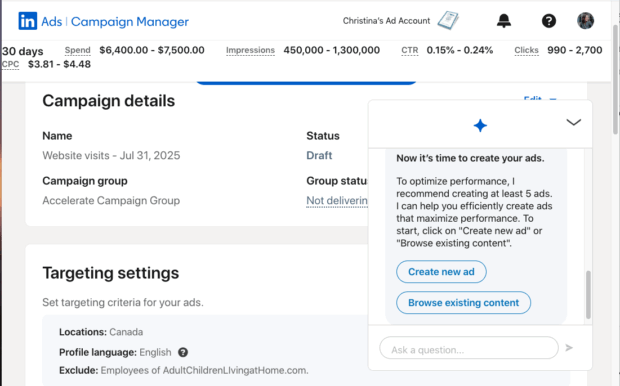
Source: LinkedIn Campaign Manager
When you launch the campaign, it goes through an optimization period of about 10 to 14 days as Accelerate uses machine learning to figure out how to best optimize the campaign.
Best for:
- Getting live fast with sensible defaults
- Lean teams or first-time advertisers
- Upper/mid-funnel programs (video, thought leadership, content downloads)
Accelerate campaigns offer fewer manual levers, so review the suggested audience before launch and set clear budget caps. (You can always shift to Classic for tighter control later.)
Classic (manual control) campaigns
What it is: LinkedIn’s traditional ad builder that allows you to manually define audiences (attributes, lists, exclusions), placements, bidding, and scheduling.
Best for:
- ABM and narrow ICP targeting
- Sequenced funnels and retargeting logic
- Experiments that need strict control (A/B cells, bid strategy tests)
Pro tip: Many teams start with Accelerate to build qualified remarketing pools, then use Classic for precise retargeting and lead capture. LinkedIn’s training materials cover using both modes for full-funnel programs.
How do you target LinkedIn ads?
You can target a specific audience on LinkedIn using professional attributes, matched audiences, and exclusions to keep your budget focused on your ideal buyer. This is where LinkedIn’s advertising advantage shows up: no other platform lets you reach a buying group with this level of professional precision.
The most effective campaigns target the full buying group, not just one decision-maker. As Gabe Feingold, Product Marketing Leader at LinkedIn, puts it:
“LinkedIn is the only platform purposefully built for B2B advertisers and the most powerful platform to influence B2B decision-makers. On LinkedIn, you can engage the full buyer group, from the C-suite to daily practitioners, in a trusted, professional environment.” – says Gabe Feingold, Product Marketing Leader at LinkedIn.
Professional attribute targeting
Professional attributes let you build an audience from the career data members keep current. Start broad enough for LinkedIn to optimize, then tighten with the attributes that define your buyer.
Common targeting attributes include:
- Job title: Reach specific roles directly.
- Job function and seniority: Group roles by department and level.
- Industry and company size: Focus on the types of companies you sell to.
- Skills: Target the expertise your buyers list.
- Groups and interests: Reach members by professional community and topic.
Matched audiences and retargeting
Matched audiences let you reach people who already know you. Upload CRM contact or company lists, retarget website visitors using the LinkedIn Insight Tag, and build audiences from video viewers, lead form openers, and post engagers. You can also create lookalike audiences to find new buyers who resemble your best customers.
When prospecting, exclude employees, competitors, current customers, and recent converters so your budget stays focused on new demand. The right mix of attributes and matched audiences gets your message to the whole buying group without wasting spend.
Schedule posts, answer messages, and manage ads from one spot. Then, show off your results in beautiful reports. It’s so easy.
Start your free trialWhat are the LinkedIn ad formats and specs?
LinkedIn offers 12+ ad formats, and the right choice depends on your objective. Each LinkedIn sponsored content format has its own benefits and requirements, so use the summary below to shortlist a format, then check the detailed specs.
| Format | Best objective | Key spec |
|---|---|---|
| Single image | Awareness, conversions | 1.91:1, 1:1, or 4:5 |
| Carousel | Consideration, feature stories | 2–10 cards, 1:1 |
| Video | Brand building, demos | 3 sec–30 min, MP4 |
| Document | Lead gen, content | PDF/DOC, under 10 pages |
| Event | Event promotion | 4:1 banner |
| Thought Leader | Engagement, awareness | Uses member’s post |
| Article/newsletter | Readership, leads | Uses original post |
| Message | Direct offers | Up to 1,500 characters |
| Conversation | Multi-path nurture | Up to 5 CTAs per message |
| Lead Gen forms | Lead capture | Up to 12 fields |
| Dynamic Ads | Followers, promotions | Desktop right rail |
| Connected TV | Upper-funnel reach | 16:9, 6–60 sec |
Single image ads
Single image ads are quick, versatile, and work across most objectives. A clear visual plus one strong promise can build awareness and nudge action without extra complexity.
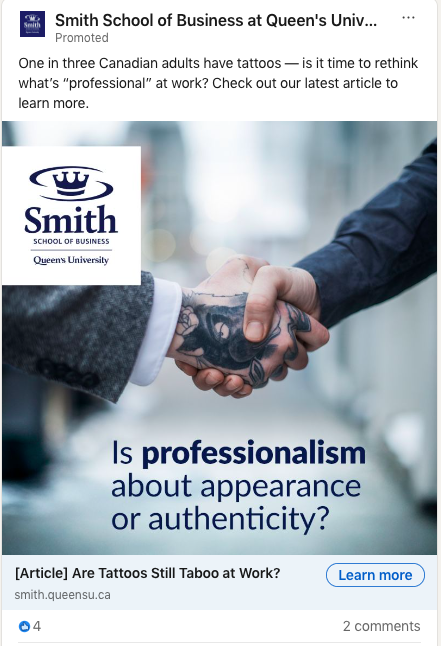
Source: Smith School of Business at Queen’s University
Best for: Clear value propositions, product launches, and retargeting.
Image dimensions: 7680 × 4320 px recommended
File size: up to 5 MB
File type: .jpg, .png, .gif
Text limits: intro 150 characters recommended (up to 600); headline 70 characters (max 200)
Aspect ratios: 1.91:1 horizontal, 1:1 square, 4:5 vertical
Carousel ads
Carousel strings multiple images into a swipeable story — ideal for showing steps, features, or variants in one ad without sending people off platform.
Because each card carries its own headline and link, you can test messages side by side and learn quickly what drives action.
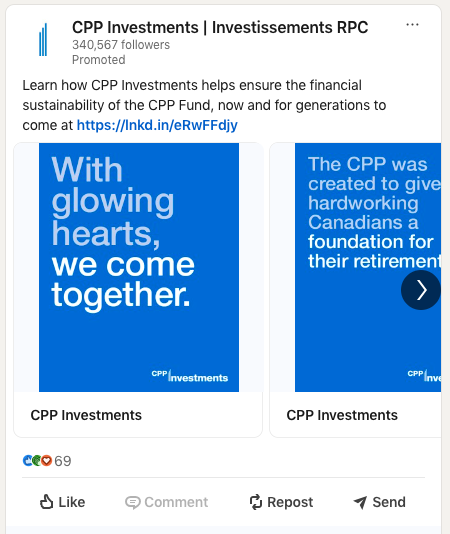
Source: CPP Investments | Investissements RPC
Best for: multi-feature stories, step-by-step walkthroughs, product comparisons, and showcasing different customer outcomes.
Cards: 2–10
Image dimensions: 1080 × 1080 px (square)
File size: up to 10 MB per card
File type: .jpg, .png
Text limits: intro up to 255 characters; card headline up to 45 characters
Aspect ratio: 1:1 only (video is not supported in carousels)
Video ads
According to eMarketer, LinkedIn is the top platform to reach a B2B audience with video, and LinkedIn even says video is one of their fastest-growing formats.eMarketer reports that video posts receive 20x more shares and 3x the engagement of other post formats.
Video is your best format for building attention and recall while telling a richer story. Use it to demo a product, explain a point of view, or bring customer outcomes to life without sending people off-platform.
Because videos auto-play muted in feed, front-load branding and key visuals in the first few seconds, add captions, and choose a clear thumbnail to earn the click.
In Feed Video Ads are video units that run up to 30 minutes long, as sponsored posts in the LinkedIn feed and across the LinkedIn Audience Network. With video ads, you can include a lead gen form as the CTA.
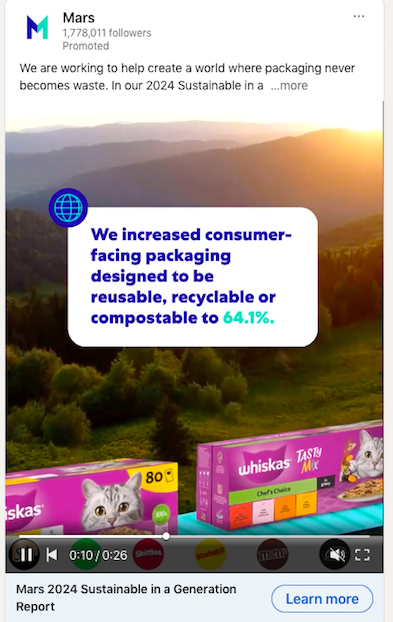
Source: Mars
Best for: Brand building, product demos, thought leadership, and retargeting sequences.
File type: MP4 (AAC audio)
Duration: 3 seconds–30 minutes (15–30 seconds is a reliable sweet spot)
Dimensions and ratios: 1:1, 16:9, 4:5, 9:16; 360–1920 px
File size: up to 500 MB
Text limits: intro ~150 characters recommended (up to 600); headline ~70 characters recommended (up to 200)
Thumbnail and captions: add a still that matches the aspect ratio; include captions for silent autoplay
Document ads
Document ads let people read and download your asset directly in the feed. Share it ungated to build reach, or gate with a Lead gen form to capture high intent before download.
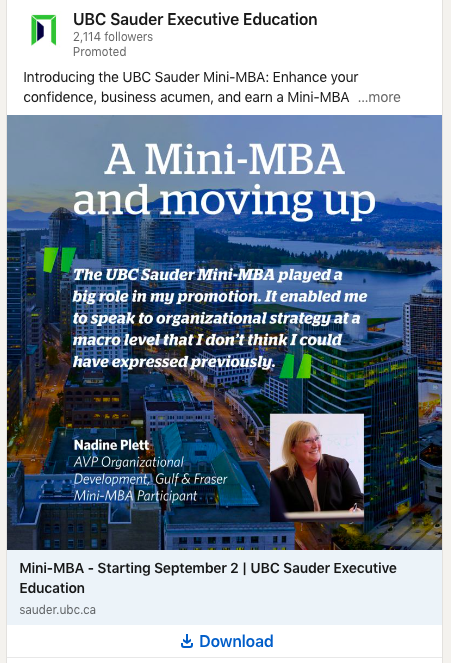
Source: UBC Sauder Executive Education
Best for: Guides, checklists, benchmark reports, case studies, and templates.
File types: PDF, DOC, DOCX, PPT, PPTX
File size: up to 100 MB
Length: aim for under 10 pages for in-feed browsing; hard max 300 pages (or ~1M words)
Layout: any standard page size; design for mobile legibility
Text limits: intro ~150 characters recommended; headline ~70 characters
Tips: title the cover with a clear promise (“Template,” “Checklist,” “Benchmarks”); keep hyperlinks clean and test the downloadable file
Event ads
Event ads promote a LinkedIn Event directly in the feed so people can discover it, RSVP, and join — marketers who use them see up to 31x more viewership. You can run them before, during, and after the event to keep momentum going, including live streams and replays.
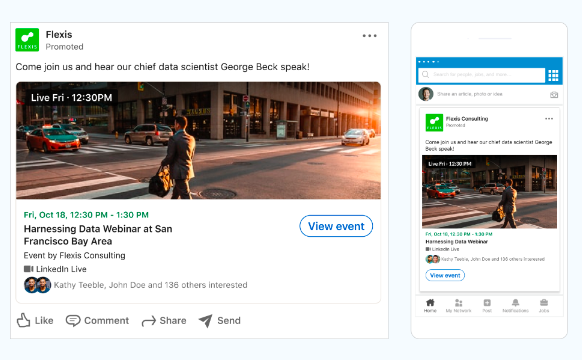
Source: LinkedIn
Best for: Webinars, product launches, conferences, community meetups, and post-event replays.
Note: To make an event ad on LinkedIn, you must first create a LinkedIn event on your page.
Source: Pulls name, date, and image from your LinkedIn Event
Image ratio: 4:1 (from the Event banner)
Intro text: up to 600 characters
Event name (optional in ad): up to 255 characters
URL: must link to a LinkedIn Event page
Timing: set start and end dates and times in Campaign Manager
Retargeting: audiences available from registrants, viewers, and engagers
Thought leader ads
Thought Leader ads promote a member’s LinkedIn post (an executive, product manager, creator, customer, or partner) so it appears in-feed with a small “Promoted by [Your Company]” label. Because the creative is the original post, the message stays authentic and often earns stronger engagement than Page-first ads.
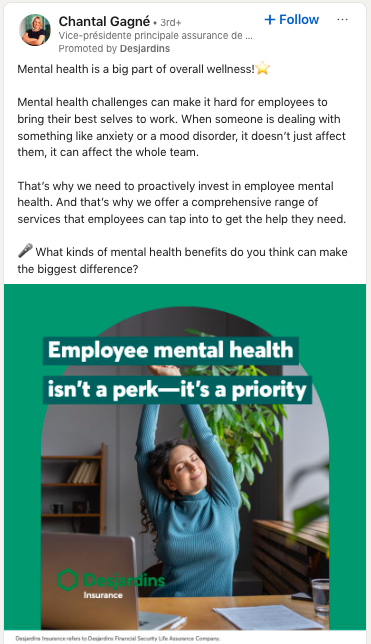
Source: Chantal Gagné
Best for: Executive points of view, product explainers, customer or employee storytelling, and event promotion using a member’s post that links to your LinkedIn Event.
Objectives: Brand awareness, Engagement
Ad formats: Single image, Video, Event
Who you can promote: Employees and 1st- or 2nd-degree connections (author approval required)
Eligible content: Member posts with image or video, third-party links, Event posts, LinkedIn Articles, and Newsletters
Not eligible: Documents, multi-image, polls, reshared, “celebration” posts; posts shared to Groups
Permissions: Super admin, Content admin, or Sponsored Content Poster on your Page
Creative and CTA: Uses the original post; no separate ad fields. Single image/video TLAs have no CTA button; Event posts include RSVP; links in the post stay clickable
Reporting: Full metrics in Campaign Manager; author sees combined organic and paid totals
Article and newsletter ads
Article and newsletter ads promote your native long-form content on LinkedIn. The ad uses the original post, so it feels authentic and sends clicks straight to the Article or Newsletter page. It is a solid way to grow qualified readership and, for Articles, capture leads with a lightweight unlock flow.
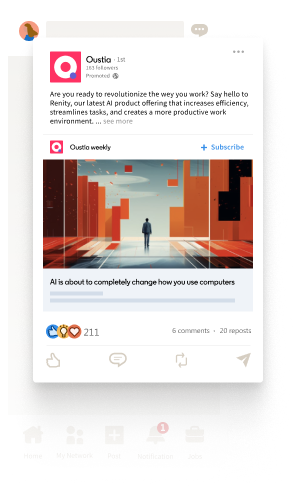
Source: LinkedIn
Best for: Growing Article reads and Newsletter subscribers, distributing long-form points of view, and turning engaged readers into leads with Unlock Article.
Creative source: Uses the original Article or Newsletter post; you don’t upload new media into this ad.
Text fields: You cannot add a separate headline or intro text here. Edits must be made to the original post.
Clickthrough behavior: No custom URL field. Clicks take members to the Article or Newsletter page on LinkedIn.
CTA options: With the Lead Generation objective (Article Ads only), the CTA is “Unlock Article.” Other objectives don’t offer a CTA button.
Dimensions and file limits: Follow Single image ad specs for images and text limits (since the ad uses an image-based post). See Single image specs for details.
Sponsored messaging ads
Sponsored Messaging ads are a great way to engage your prospects with 1:1 messages sent directly to their LinkedIn Messaging inbox. There are two types: Conversation ads and Message ads.
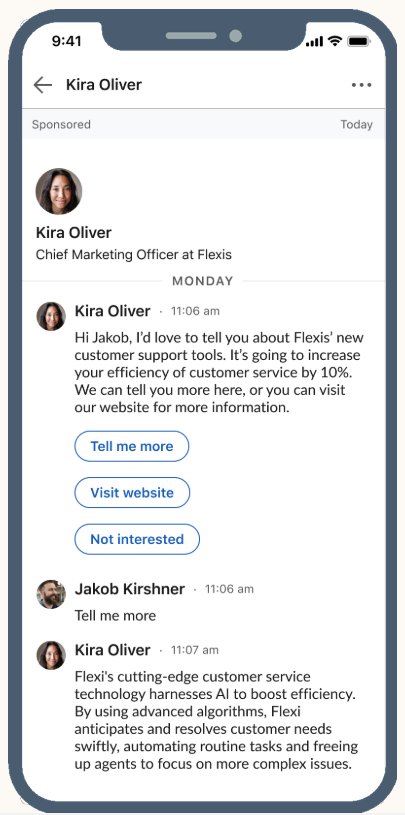
Source: GGU International on LinkedIn
Message ads
Message ads deliver a one-to-one sponsored message to a member’s LinkedIn inbox from a chosen sender. They are built for a single, clear action, with an optional desktop banner to reinforce your offer.
Best for: Webinar or event invites, product offers with one next step, trials and demos, and time-sensitive announcements.
Subject line: up to 60 characters
Message text: up to 1,500 characters
CTA button: up to 20 characters
Custom footer (optional): up to 2,500 characters
Landing page URL: up to 1,024 characters; must use http:// or https://
Banner (optional, desktop only): 300 × 250 px, JPG or PNG, up to 2 MB
Sender: uses the LinkedIn profile image and name of your designated sender
Frequency cap: each member can receive Sponsored Messaging about once every 45 days
Conversation ads
Conversation ads create a choose-your-own-path experience in LinkedIn Messaging. Multiple buttons branch to different offers or next steps, so people can self-select what they want.
Best for: Multi-offer nurtures, product tours with several paths, qualification flows, and lead generation directly from the inbox.
Message text: up to 8,000 characters
CTA buttons: up to 5 per message, 25 characters each; up to 50 buttons total across a conversation
Custom footer (optional): up to 20,000 characters
Landing page URL: up to 2,000 characters; must use http:// or https://
Banner (optional, desktop only): 300 × 250 px, JPG or PNG, up to 2 MB
Sender: uses the LinkedIn profile image and name of your designated sender
Frequency cap: each member can receive Sponsored Messaging about once every 45 days
Lead gen forms
Lead Gen forms let people submit their information without leaving LinkedIn. Forms are pre-filled with LinkedIn profile data and can be attached to in-feed ads (single image, video, carousel, document) and to Sponsored Messaging, or used to unlock a LinkedIn Article.
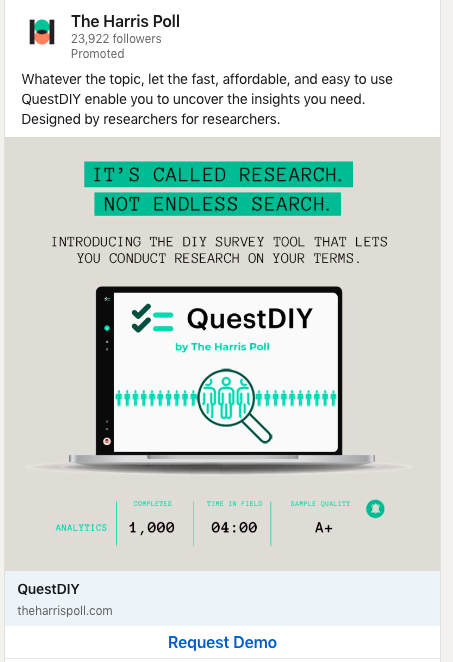
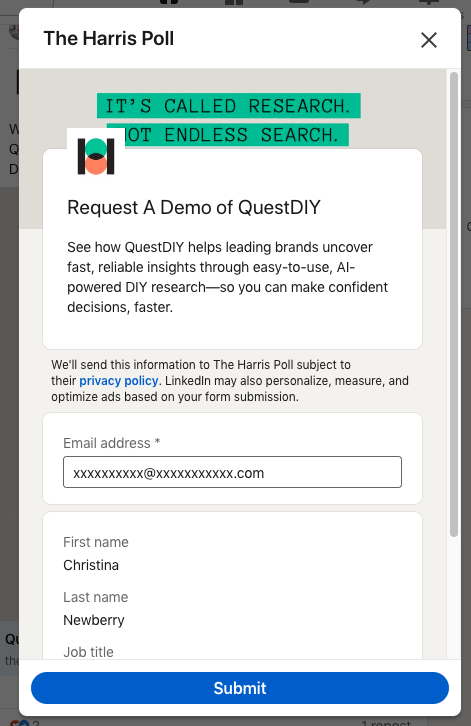
Source: The Harris Poll
Best for: Demos, trials, webinar registrations, content downloads.
Form name: up to 256 characters
Offer headline: up to 60 characters
Offer detail (optional): up to 160 characters
CTA label: up to 20 characters
Confirmation message: up to 300 characters
Fields per form: up to 12 (3–4 recommended)
Custom questions: up to 3, 100 characters each
Available fields: contact, work, company, education, demographic
Privacy policy URL: required; up to 2,000 characters (http or https)
Delivery: sync to your CRM or download from Campaign Manager
Dynamic ads (Follower, Spotlight, and Text ads)
Dynamic Ads run in the desktop right rail and personalize with a member’s name and, if enabled, their profile photo. This group includes Follower ads, Spotlight ads, and Text ads, each with a slightly different goal.
Follower ads
Follower ads promote your LinkedIn Page to the right people in the desktop right rail. The unit personalizes with a member’s name and, if enabled, their profile photo to make the follow feel more relevant.

Source: Schulich Business School
Best for: Growing high-quality Page followers among specific roles, industries, or regions.
Placement: Desktop right rail (Dynamic Ads)
Destination: Your LinkedIn Page
Company logo: 100 × 100 px, JPG or PNG, up to 2 MB
Headline: up to 50 characters
Description: up to 70 characters
Company name: up to 25 characters
CTA options: Visit company, Visit jobs, Visit careers, Visit life
Personalization: Member name macros; optional member profile photo
Spotlight ads
Spotlight ads drive people to a specific landing page, product page, or promotion. They appear in the desktop right rail and personalize with a member’s name and, if enabled, their profile photo.
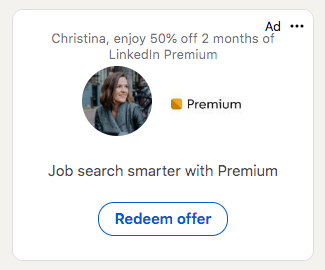
Source: LinkedIn
Best for: Product launches, limited-time offers, pricing or comparison pages, and fast paths from impression to landing page
Placement: Desktop right rail (Dynamic Ads)
Destination: Any landing page (http or https), up to 500 characters
Company logo: 100 × 100 px, JPG or PNG, up to 2 MB
Optional background image: 300 × 250 px, JPG or PNG, up to 2 MB
Headline: up to 50 characters
Description: up to 70 characters
CTA label: up to 18 characters
Personalization: Member name macros; optional member profile photo
Text ads
Text ads are small pay per click or cost per impression units that appear on desktop in the right rail or top banner. Use them to reinforce your message alongside in-feed campaigns and drive efficient traffic.
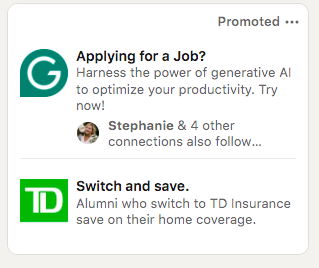
Best for: Efficient desktop reach, ABM coverage and retargeting, quick value proposition tests.
Placement: Desktop right rail and top banner
Destination: Your landing page (http or https)
Logo image: 100 × 100 px, JPG or PNG, up to 2 MB
Headline: up to 25 characters
Description: up to 75 characters
CTA options: Apply, Download, Learn more, Sign up, Subscribe, Register, Request demo
Connected TV ads
CTV ads reach professional audiences while they stream on the big screen via Paramount and NBCUniversal’s platforms. You set up the campaign in Campaign Manager, target with LinkedIn’s first-party professional data, and later retarget viewers with in-feed formats to drive action.
Best for: Upper-funnel reach, brand storytelling, product launches, and creating high-quality video audiences to retarget.
Dimensions: 1920 × 1080 px (recommended) or 1280 × 720 px
Aspect ratio: 16:9
Format/codec: MP4, H.264
Duration: 6–60 seconds (15 or 30 seconds recommended)
Max file size: 500 MB
Bitrate: 12 Mbps minimum (15–40 Mbps recommended)
Frame rate: 23.98, 24, 25, 29.97, or 30 fps (29.97 fps recommended)
Audio: 2-channel AAC or PCM, 48 kHz; target −23 LUFS
Retargeting: Build audiences from CTV video viewers for follow-up in feed
Brand safety: Category exclusions available during setup
How do you build a high-impact LinkedIn ad?
Here’s how Feingold framed the single most important principle behind successful campaigns:
“One of the most effective ways to create a LinkedIn campaign is to start with your business objective and work backwards. Begin by choosing the right campaign objective in Campaign Manager, tailor the creative to the business outcome you want to drive, and make sure you have the right measurement in place to measure what actually drives pipeline, rather than vanity metrics.”
Why should you start with the outcome?
Pick your objective first, then let it guide your decisions. An awareness campaign should communicate the payoff at a glance and earn attention quickly. A lead generation campaign should lower friction and make the next step feel safe and useful. Hold yourself to the scorecard that matches the objective you chose.
How do you make your creative earn attention?
Lead with the outcome your buyer will feel. People decide in seconds, so open with a clear hook, keep copy tight, and show brand or product early without crowding the message.
Design for mobile with square or vertical crops and legible type.
In video, captions are essential and the first three seconds do most of the work. In document ads, promise something concrete on the cover and keep it short enough to skim in feed, even if the download goes deeper.
How should you plan the sequence?
Treat campaigns as a journey. A LinkedIn strategy template can help you map the sequence: warm new audiences with thought leadership or product education (video, document, or article), follow with single image or carousel offers, then ask for a form fill.
Remember to target the whole buying group as you sequence (see how to target LinkedIn ads above). Launch distinct concepts, give budgets time to exit learning, and make small changes so delivery can stabilize.
How do you measure what matters?
Judge success against your chosen objective. Awareness is about reach and quality attention. Tools like sentiment analysis can help gauge brand perception shifts. Lead programs are about completion rate and downstream opportunity creation.
Keep attribution windows consistent so trends are comparable, and use diagnostics to explain performance shifts, not incidental clicks.
How do you measure and track LinkedIn ad performance?
The cleanest way to judge success is to measure against the objective you chose at the start, then set up tracking so you can connect ad spend to pipeline.
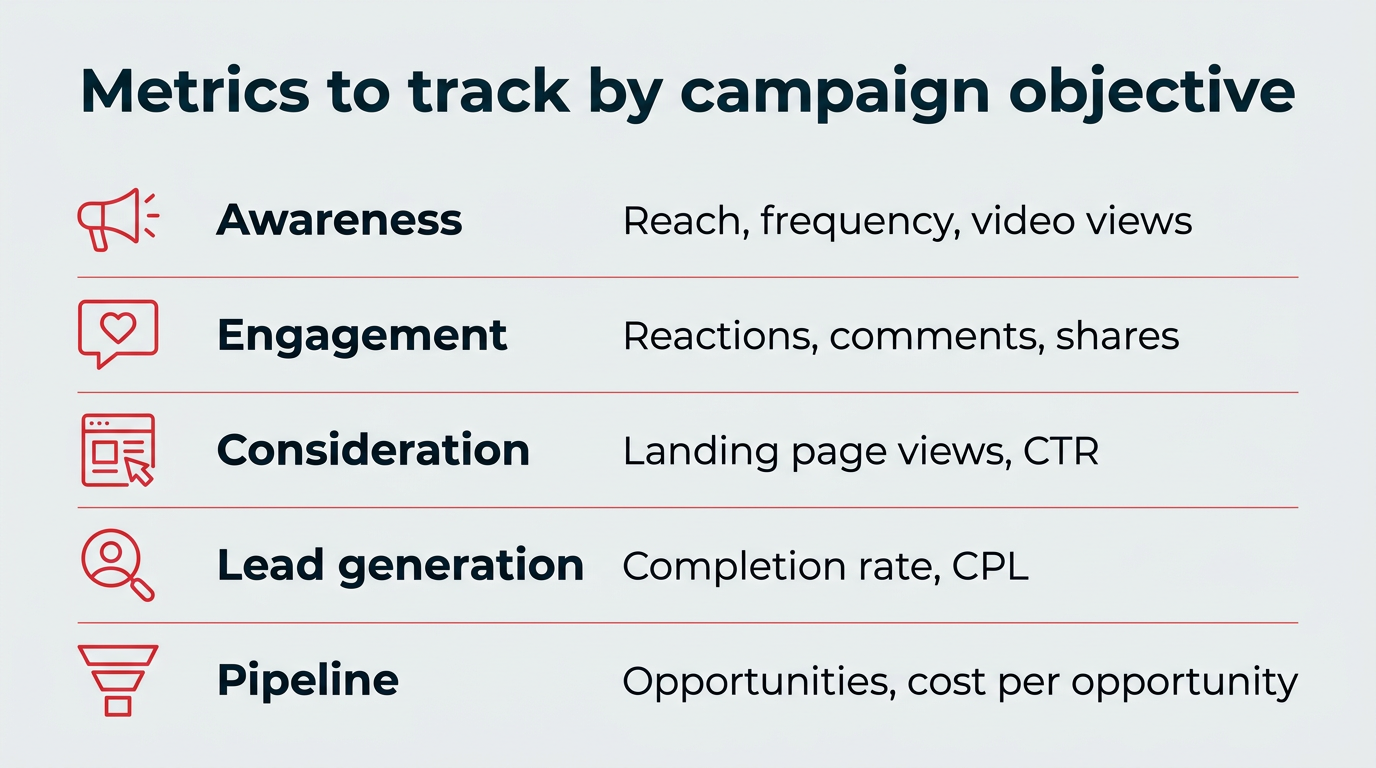
What should you track by objective?
Here are the top metrics to track, depending on your goal.
- Awareness: Reach, frequency, video completions (if applicable). Look for follower growth and expanded retargeting pools too.
- Engagement and thought leadership: Reactions, comments, shares, saves, follows. For video, include cost per engaged view.
- Consideration and site traffic: Landing page views first, then CTR and cost per LPV. If CTR is fine but LPVs lag, fix page speed or message match.
- Lead generation: Form open rate, completion rate, and CPL. Sanity-check quality (role, seniority, industry) and sync to CRM fast.
- Pipeline impact: Lead→MQL→SQL conversion, opportunity rate, and cost per opportunity. Just keep attribution windows consistent.
- Diagnostics: CPM, CPC, conversion rate, frequency, audience size, and creative diagnostics. Make small, spaced changes and allow learning to complete.
Check early signals on day 1 and day 3 for breakage, then make decisions weekly.
How do you set up conversion tracking?
To measure LinkedIn ads ROI accurately, install the LinkedIn Insight Tag, a lightweight JavaScript snippet you add to every page of your site. You can find it in Campaign Manager under Analyze → Insight Tag, then place it in your site’s global footer or through a tag manager.
Once the tag is live, create conversion actions in Campaign Manager for the events that matter, such as demo requests, sign-ups, or purchases. Assign a value to each conversion so LinkedIn can report cost per conversion and return on ad spend.
For full pipeline attribution, connect those conversions to your CRM so you can trace a lead from click to closed deal. You can find setup details in LinkedIn’s Insight Tag documentation. Clean tracking turns raw clicks into the ROI story your leadership actually cares about.
What are the best tips for optimizing and scaling LinkedIn ads?
You have your account set up, formats chosen, and a clear measurement plan. Now it’s time to help good campaigns learn fast, keep creative fresh, and scale what’s working.
How do you tune for delivery without whiplash?
Launch with an automated bid strategy to establish a baseline, then move to cost control once stable. Make small, spaced changes (one variable at a time). Check early signals on day 1 and day 3, then adjust weekly.
Why should you improve creative before micromanaging bids?
Most gains come from clearer offers and stronger first impressions. Rotate 3–5 distinct creative concepts, retire fatigue, lead with the outcome, and make the first three seconds of video earn the next ten.
How do you build and sequence audiences by intent?
Create audiences for site visitors, video viewers, lead form openers and completers, and post engagers, and keep them in separate ad sets for pacing. Then sequence the journey: educate new viewers, use proof for warm visitors, and ask for forms only when curiosity is there.
Warm with thought leadership or product education (video, document, article), follow with single image or carousel offers, then ask for a form fill. For Sponsored Messaging, respect channel frequency limits so messages feel useful, not intrusive.
How do you scale what works carefully?
When a campaign hits goal, widen reach or test adjacent audiences, or increase budget gradually. If expansion stalls performance, roll back to the last stable setting and change one lever at a time (creative, audience, or bid).
Feingold shares that, “just like B2B advertising, LinkedIn Ads is not about quick wins; it’s about quality outcomes that advance pipeline performance by nurturing your ideal customers and building your brand.
We recommend that B2B marketers focus on targeting the whole buyer group that will influence a purchase, not just executive decision makers. And rather than jumping right into lead generation, engage your audience first with thought leadership and brand storytelling before asking for a lead.”
FAQ: LinkedIn ads
What are the main LinkedIn ad formats?
How much do LinkedIn ads cost?
Are LinkedIn ads worth it for B2B marketing?
How does the LinkedIn ad auction work?
How do I target a specific audience with LinkedIn ads?
What is the LinkedIn Insight Tag and do I need it?
Should I use Accelerate or Classic campaigns?
What should I measure for LinkedIn ads?
When should I use Lead Gen forms instead of a landing page?
How often can I send Sponsored Messages?
Save time managing your social media marketing strategy with Hootsuite. Publish and schedule posts, find relevant conversions, measure results, and more â all from one dashboard. Try it free today.
The post LinkedIn ads guide: Campaign types, ad specs, and expert tips appeared first on Social Media Marketing & Management Dashboard.
* This article was originally published here To read more articles like this visit us at yourdigitalmarketingbootcamp.blogspot.com